AutoZonePro Mobile
- 4.5
- Rating
- 100.00K
- Installs
- Free
- Price

 Analysis by App-foxy
When a customer is waiting for a replacement part, the difference between a smooth counter visit and a frustrating delay often comes down to how quickly the professional can identify, order, and track the right item. That is the situation I found AutoZonePro Mobile built for. It is a free Auto & Vehicles app from AutoZone, Inc., aimed at professionals rather than casual drivers browsing for general car advice.
My first impression was that this is a focused work tool, not a broad automotive companion. Its store summary, “Parts Ordering for the PRO,” sets the expectation clearly: the app is meant to support parts-related work. That narrow purpose is its biggest strength. It avoids trying to become a repair encyclopedia, a driving assistant, or a general marketplace. Instead, it puts the emphasis on the practical path from a repair need to a parts order.
After using it as a professional would, I see a useful option for technicians, repair shops, and other automotive workers who already depend on AutoZone for parts. I would not recommend it simply because someone owns a car. The value appears when the user has a real vehicle, a repair task, and a reason to move an order through a professional workflow rather than make a one-off retail purchase.
You May Also Like

 Google Keep - Notes and lists
Google Keep’s Quiet Growth Shows the Appeal of Simpler Notes
As mobile work gets busier, Google Keep keeps winning a simple contest: capture a thought quickly, find it later, and get on with the day.

 Blood Strike: 2.5 Anniversary
Blood Strike’s Loadouts Turn Every Drop Into a Tactical Gamble
A close look at Blood Strike’s custom loadouts: how fast access to signature weapons reshapes its battle royale rhythm, rewards preparation, and narrows the gap between fights.

 Pandora - Music & Podcasts
Pandora’s Music Is Easy to Start, but Harder to Recover
Pandora’s strength is its low-effort path from a seed to a station. Its weak spot is how much confidence it asks you to place in connection, setup, and quiet recovery.

 8 Ball Pool
 Is Built on Rivalries, Rematches, and Routine
A close look at the rivalries, rematches, shared routines, and unanswered safety questions that turn a quick pool match into a persistent mobile community.

 Samsung Music
’s Quiet Strength Is Playing What You Already Own
Its reach comes less from spectacle than from dependable access to a personal library. That simplicity is both the app’s strongest retention engine and its ceiling.

 AccuWeather: Weather Radar
AccuWeather Review: A Quick, Clear Forecast for Everyday Decisions
For everyday plans, the best forecast is the one you can understand quickly. AccuWeather makes rain timing, radar, and local conditions easy to act on, with a few trade-offs.
More From Our News Desk



From a repair request to a parts order
I’d treat the order itself as one checkpoint in a larger repair workflow, not as proof that the job is ready to proceed. Before handing it off, I would make sure the request is tied to the correct vehicle and that a colleague knows who owns the next step; that small bit of clarity can prevent a useful mobile order from stalling between the bay and the parts desk.
The starting condition matters more than the app itself
The most important preparation happens before opening the app. A professional needs to know what vehicle is being worked on and what kind of part is required. If the request is vague, no ordering app can remove all of the uncertainty. “I need a brake part” is not enough for a reliable result; the technician still needs to narrow the job to the correct component and vehicle application.
This is where I think the app fits naturally into a busy shop. It can become the digital point between diagnosis and purchasing. Instead of leaving the work area, finding a counter terminal, or relying on a handwritten note, the professional can begin the ordering process from a mobile device. That does not replace mechanical judgment, but it can reduce the administrative distance between identifying a need and acting on it.
I also found that the app makes more sense when the user has an established process. A technician who regularly handles several vehicles can approach each order with the same sequence: confirm the vehicle, identify the required part, review the available result, and pass the order to the person or location responsible for fulfillment. That repeatability is more valuable than a flashy interface.
For a new user, the sensible approach is to open the app before a customer is waiting and become familiar with its ordering flow. A few minutes spent understanding where vehicle and part information belong can prevent hurried mistakes later. In a professional environment, accuracy is more important than saving a few taps.
How I would use it during a normal repair
Imagine a small repair shop preparing a vehicle for a same-day brake job. The technician confirms the vehicle details and determines which replacement components are needed. Rather than sending another employee to a store with an incomplete description, the technician starts the order in AutoZonePro Mobile while the vehicle is still on the lift or in the service bay.
The useful workflow is not simply “search and buy.” It is a sequence of checks. I would first verify that the selected vehicle matches the vehicle in the bay. Then I would check the part description carefully, paying attention to the distinction between similar components. If the order contains several items, I would review the complete selection before handing it off. This final pause is easy to skip on a phone, but it is exactly where a professional can catch a wrong application or an unnecessary duplicate.
That review step is one of the practical insights I would emphasize to another user: treat the mobile screen as an ordering workspace, not as a shortcut around verification. A phone makes it convenient to move quickly, but convenience can encourage premature confirmation. The app helps with the transaction; the technician remains responsible for the mechanical match.
Once the order is ready, the next question is not only whether the part is correct, but who needs to act next. In a small shop, the person placing the order may also receive the parts. In a larger operation, a service writer, parts coordinator, or manager may need to review the request. Thinking about that handoff before submitting the order keeps the workflow clear.
Why the professional focus is useful
Many automotive apps are designed around the vehicle owner. They may explain maintenance, provide reminders, estimate general repair costs, or help someone find a nearby business. Those tools can be helpful, but they are not substitutes for a professional parts-ordering workflow. AutoZonePro Mobile is more specialized, and that specialization gives it a clearer job.
For a technician, the benefit is less about entertainment or education and more about reducing interruptions. A mobile ordering tool can keep the person close to the repair context instead of forcing every request through a separate desktop process. For a shop manager, the benefit is consistency: staff can follow a recognizable route from the repair request to the order instead of improvising each time.
There is also a useful separation between diagnosis and purchasing. The technician can decide what the vehicle needs, while another employee can take responsibility for reviewing or completing the order. That division works particularly well when the shop wants the person with the strongest mechanical knowledge to remain focused on the vehicle.
Handoffs are where the real value appears
The app becomes more useful when I view it as part of a chain rather than an isolated tool. The first handoff is from the customer’s complaint to the technician’s diagnosis. The next is from the diagnosis to the selected part. After that, the order may move from the technician to a service writer, manager, or parts desk. Each transition can introduce an error, so keeping the information together is important.
A practical habit is to include enough context in the shop’s internal communication to identify the vehicle and repair task, even when the app contains the order details. The app may support the parts transaction, but it does not automatically replace the shop’s broader communication routine. A colleague receiving the request should know what job the part belongs to and whether the vehicle is waiting.
This is another non-obvious trade-off: mobile ordering can reduce verbal back-and-forth, but it can also make an order feel more self-contained than it really is. A selected part is not the same as a completed repair plan. I would still use the shop’s normal method for documenting the diagnosis, customer approval, and installation requirements.
For a mobile technician or a professional moving between work areas, the handoff may be simpler. The same person can identify the need and submit the order without returning to a fixed computer. That is where the app has a clear practical advantage over a traditional counter-only routine.
What the result looks like in practice
A successful outcome is not merely seeing a part in a list. The real result is a cleaner path to having the correct item assigned to the correct repair. If the vehicle information is accurate, the selected component is reviewed, and the order reaches the right person, the app has done its job well.
I would judge the result by three questions. Did the professional avoid re-entering the same information several times? Did the shop preserve enough context for the next person in the process? Did the order reduce uncertainty rather than create another message to interpret? These questions are more useful than judging the app by how modern its screens look.
In the brake-job example, the best outcome is that the technician can return attention to the vehicle while the order proceeds through the shop’s established process. If another employee handles the purchasing handoff, that person should be able to understand what was requested without guessing. The app is strongest when it supports that division of labor quietly.
It is also worth remembering that speed is not the only measure of success. A rapid order that contains the wrong application is a poor result. I would rather spend an extra moment reviewing the vehicle and part details than create a delay through a preventable mismatch. The mobile format encourages efficiency, but professional accuracy has to remain the priority.
Where the workflow can break
The first weak point is incomplete information. If the vehicle details are wrong or the required component has not been properly identified, the app cannot compensate for the mistake. This is especially important when several parts look similar or when a repair involves related components that are easy to confuse.
The second weak point is the handoff. A technician may submit an order believing someone else will monitor it, while the manager assumes the technician is handling the next step. That is not a problem unique to this app, but mobile tools can make responsibility less visible. Shops should decide who reviews orders and who communicates any issue before relying on the app during busy periods.
The third issue is fit. AutoZonePro Mobile is not the right choice for every automotive user. A private driver looking for maintenance reminders, driving information, or a general explanation of a dashboard warning will likely find a consumer-focused app more suitable. Someone who buys parts only occasionally may also prefer a straightforward retail experience rather than a professional-oriented workflow.
It may also be a poor fit for a shop that needs one application to handle every business function. Parts ordering is only one part of a repair operation. Scheduling, invoicing, customer communication, estimates, inventory control, and technician time tracking may still require other systems. I would not treat this app as a complete shop-management replacement.
Compatibility, cost, and practical expectations
The app is free, carries an Everyone age rating, and runs on Android devices using version 7.0 or later. That makes it approachable for shops with a range of Android hardware, although the age of a device can still affect the comfort of mobile work. A small screen, worn battery, or unreliable connection can make any ordering process more tiring, regardless of the app’s capabilities.
The current version is 4.1.0. I would keep the app updated when possible, particularly on a work device, but I would also test the workflow on the actual phones used by staff. A process that feels fine on a newer handset may be less convenient on an older one. This is a simple operational check that can prevent complaints after the app is introduced to a team.
Its public adoption is modest but meaningful: it has passed one hundred thousand installs, with an average rating of 4.5 from around one thousand two hundred ratings and five hundred nineteen written reviews. I read that as a sign of a focused tool with a defined audience rather than a universal automotive app. The rating is encouraging, but a shop should still judge it against its own ordering habits.
Because the app is free, the main cost is not a purchase price but the time spent learning and integrating it. That is a favorable trade for a professional who places parts orders regularly. For someone who uses it once in a long while, the setup and workflow may offer less benefit than simply using the familiar alternative already available to them.
Small habits that make the process safer
I would begin every order by confirming the vehicle before looking at the part result. This sounds obvious, but it prevents a common mental shortcut: seeing a familiar part name and assuming it belongs to the vehicle currently being repaired. The vehicle should anchor the search, not the other way around.
Next, I would separate urgent items from optional items before submitting. If a repair requires several components, the person receiving the order should be able to tell which parts are essential to getting the vehicle back on the road. This makes the handoff easier and helps the shop respond if one item needs further review.
I would also avoid using the app as the only record of the repair decision. Keep the shop’s normal job notes and customer approval process in place. The ordering tool can handle the parts request, while the repair record explains why the part was needed and what work remains. That division reduces confusion when a customer asks about the job later.
Finally, I would establish one clear confirmation point. After the order is submitted, someone should know whether the next step is collection, delivery, internal review, or customer notification. This simple rule turns a mobile order into a completed workflow instead of leaving it suspended between departments.
Who should choose it
I would recommend AutoZonePro Mobile to automotive professionals who regularly order parts and want to move that task closer to the vehicle and the technician. It is particularly suitable for a shop where employees share responsibility and need a practical bridge between diagnosis and purchasing.
It is less suitable for a private car owner who wants broad maintenance guidance, or for a business searching for a single platform to manage its entire operation. Those users should look for tools designed around consumer education or full shop administration. This app earns its place through a narrower purpose, so expecting it to do everything would be unfair.
The strongest reason to use it is not that it eliminates every step. It does not. The reason is that it can make the right steps easier to organize: identify the vehicle, select the needed part, review the request, and pass it to the person responsible for the next action.
My overall take after following the full workflow
AutoZonePro Mobile feels most convincing when I imagine it in the middle of a real repair rather than on a casual browsing session. A technician has a vehicle in front of them, a part decision has been made, and the shop needs to turn that decision into an order without unnecessary movement or repeated explanations. In that setting, the professional focus is an advantage.
Its limitations are equally clear. It cannot replace careful diagnosis, shop communication, or a complete management system. The workflow can still break through wrong vehicle information, unclear responsibility, or a rushed review. Users who understand those boundaries will get more from it than users expecting a universal automotive assistant.
AutoZone, Inc. has kept the app centered on professional parts ordering, and I think that is the right approach. For the intended audience, the free price and accessible Android requirement make it easy to test in an existing process. My recommendation is straightforward: if your daily work includes ordering AutoZone parts for repairs, try it as a controlled part of your workflow, starting with one clear handoff and a deliberate final review. If your needs are broader or mostly personal, choose a more general automotive app instead.
FAQs for AutoZonePro Mobile
01What is AutoZonePro Mobile and who is it for?
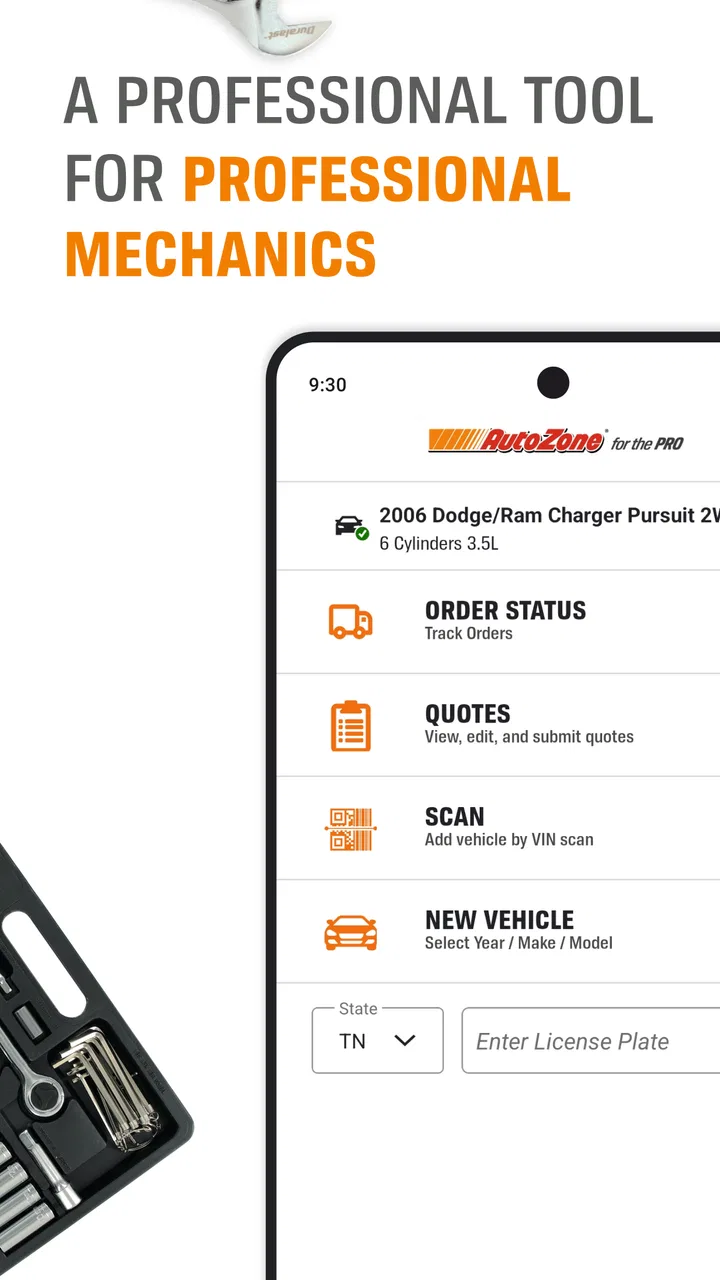
AutoZonePro Mobile is a comprehensive app designed specifically for automotive professionals, such as mechanics and shop owners. It provides easy access to AutoZone’s extensive inventory, pricing, and availability, enabling users to order parts and track deliveries directly from their mobile devices. Ideal for those in the automotive repair industry, the app streamlines operations and enhances productivity.
02How user-friendly is the AutoZonePro Mobile app?
AutoZonePro Mobile is designed with a user-friendly interface that prioritizes ease of navigation. The app provides intuitive features such as a search bar for quick part look-ups, order history for easy reordering, and customizable settings to tailor the experience to individual needs. Even those new to mobile technology will find it accessible and straightforward to use.
03What features does AutoZonePro Mobile offer to enhance productivity?
The app offers several features aimed at boosting productivity, including real-time inventory checks, order tracking, and quick access to technical repair information. Users can also create and manage their accounts, view detailed product specifications, and receive notifications about promotions or new products. These features ensure efficient workflow management for professionals.
04Is AutoZonePro Mobile compatible with both Android and iOS devices?
Yes, AutoZonePro Mobile is fully compatible with both Android and iOS platforms. It can be downloaded from the Google Play Store for Android users and the Apple App Store for iOS users. This cross-platform compatibility ensures that a wide range of users can benefit from the app’s features without device limitations.
05Does AutoZonePro Mobile require an internet connection to function?
While certain features of AutoZonePro Mobile, such as accessing the latest inventory data and placing orders, do require an internet connection, some functions can be accessed offline. Users can view previously downloaded information and manage their account settings without connectivity, providing flexibility for professionals on the go.
Pros
- User-friendly interface for quick navigation.
- Comprehensive parts catalog access.
- Real-time order tracking feature.
- Barcode scanning for inventory management.
- Integration with existing AutoZonePro accounts.
Cons
- Limited offline functionality.
- Occasional slow loading times.
- Requires stable internet for best use.
- Some features may need a subscription.
- No dark mode available yet.

AutoZonePro Mobile
Gallery